Something subtle happens as your Claude Code context fills up. The output gets slightly less sharp. The architecture suggestions get more generic. The creative leaps come less often. The code still works, but it’s more… obvious.
This isn’t the old “AI forgot what I said” problem — Opus 4.6 stays on target like a bloodhound, even at 80% context. It’s more like the difference between a colleague who’s fresh in the morning and one who’s been in meetings all day. Still competent. Just not at their best.
I run a context percentage indicator in my status bar. Green when usage is low, yellow at 40%. When it turns yellow, I pay attention.
Add this to your status bar
The simplest version is a bash script. Create ~/.claude/statusline.sh:
#!/bin/bash
input=$(cat)

MODEL=$(echo "$input" | jq -r '.model.display_name')
DIR=$(echo "$input" | jq -r '.workspace.current_dir')
PCT=$(echo "$input" | jq -r '.context_window.used_percentage // 0' | cut -d. -f1)

GREEN='\033[32m'
YELLOW='\033[33m'
DIM='\033[2m'
RESET='\033[0m'

if [ "$PCT" -ge 40 ]; then
    COLOR="$YELLOW"
else
    COLOR="$GREEN"
fi

echo -e "${DIM}[$MODEL]${RESET} ${DIR##*/} | ${COLOR}Context: ${PCT}%${RESET}"
Make it executable, then add this to ~/.claude/settings.json:
{
  "statusLine": {
    "type": "command",
    "command": "~/.claude/statusline.sh"
  }
}
Green means go. Yellow means “maybe wrap this up soon.”
The upgrade: ccstatusline
I’ve since switched to ccstatusline with custom Python widgets. It gives me the same 40% context bar, plus session and weekly token usage tracking.

The context bar (Ctx) uses a custom Python widget with the same green-to-yellow-at-40% logic from the bash script — ccstatusline doesn’t do that out of the box, but it supports custom command widgets that make it easy to build. The session and weekly bars track something different: your API usage limits versus elapsed time. That’s a separate problem from context quality, and I’ll write about it separately.
Why 40%
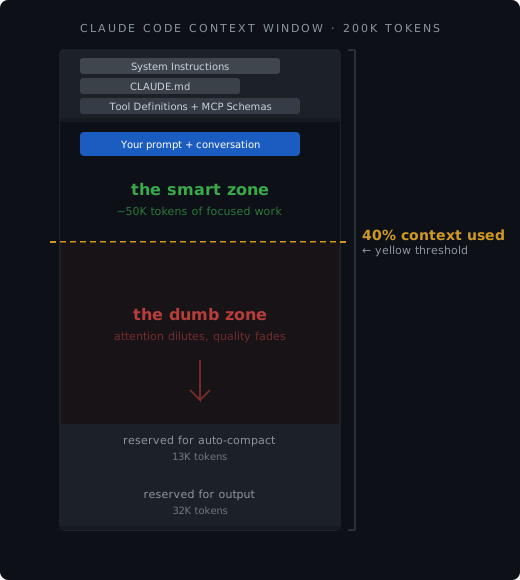
This isn’t a number I made up. It comes from a talk about Claude Code internals that divides the context window into a “smart zone” and a “dumb zone”, with the boundary at roughly 40% usage. And there’s real research backing it up.
Lost in the Middle (Liu et al., 2024). LLMs follow a U-shaped accuracy curve: they recall information best from the beginning and end of context, worst from the middle. As your conversation grows, the middle — your earlier file reads, your first few prompts — lands in a dead zone. With 20 documents in context, accuracy at middle positions dropped to 25%, versus 42% for information at the end.
Intelligence Degradation (Wang et al., 2026). Testing Qwen2.5-7B at various context fill levels, they found a critical threshold at 40-50% of maximum context length. Below it, performance stays strong. Above it, F1 scores collapsed from 0.55 to 0.30. They call it “shallow long-context adaptation” — the model learned to accept long contexts during training, but it didn’t learn to use them equally well throughout. This was a 7B model, not a frontier model — but it identified the mechanism.
Context Length Alone Hurts (Du et al., 2025). This one’s unsettling. Even when models perfectly retrieve all relevant information, performance still degrades 14-85% as input length increases. They tried replacing irrelevant context with whitespace — performance still dropped. The sheer length of input is itself the problem, independent of what’s in it.
Context Rot (Chroma Research). Tested 18 state-of-the-art models. Performance drops over 30% when relevant information sits in the middle versus the beginning or end. And here’s the kicker: adding semantically similar distractors makes it worse. Guess what a conversation history is? A long stream of semantically similar content that pushes your actual question further from the edges.
Now — this research was mostly done on smaller models where the effect is dramatic. Opus 4.6 doesn’t fall off a cliff at 40%. But the underlying mechanism is architectural. Transformers compute attention across all tokens. More tokens means more noise in that computation. Even the smartest model benefits from a cleaner workspace.
It’s not a hard rule
I want to be clear: this is a guideline, not a panic button. Going to 70% is fine. Running all the way up and letting auto-compact fire is fine. I do it regularly. The model doesn’t break. You get marginally less out of it.
Think of it like keeping your laptop battery above 40%. Nothing bad happens at 20%, but you’re aware, and you adjust your behavior accordingly. You don’t panic; you just plug in when it’s convenient.
Your context budget
Claude Code’s context window is roughly 200K tokens. I deliberately keep it there — there’s a CLAUDE_CODE_DISABLE_1M_CONTEXT environment variable you can set to prevent the larger window. I’d rather have a tighter, sharper 200K than a sprawling 1M. The pricing is the same until you exceed 200K input tokens in a single request — but once you cross that line, it’s 2x input cost and 1.5x output cost on the entire request, not just the overage. In a long session, context can quietly drift past that boundary.
But that 200K isn’t all yours. System instructions, your CLAUDE.md, tool definitions, and MCP server schemas eat from the top. Output and compaction reserves claim another 45K. Depending on your setup, you’re left with roughly 105-138K of actual working space — and 40% of that is about 50K tokens. Sounds like a lot, but a couple of file reads and some back-and-forth and you’re there fast.
What to do when it turns yellow
You have options, and none of them are emergencies:
Start a new session. This is usually best. Summarize what you’ve done and what’s left in a FEATURE.md, then start fresh. The new session gets a clean context, and the summary gives it everything it needs to continue.
Compact manually. Type /compact when you know there’s exploration output you don’t need anymore. You can even focus it: /compact focus on the database migration work. This is better than letting auto-compact fire at a random moment, because you control what gets preserved.
Use sub-agents. They get their own fresh context window. Any heavy exploration — searching the codebase, reading documentation, researching a question — can run in a sub-agent. The results come back as a clean summary, without filling your main context with all the intermediate steps.
Let auto-compact run. It fires automatically as you approach the limit. It’s lossy — roughly 20-30% of original detail survives — but it works. Anthropic has been progressively lowering the threshold from ~90% to ~75% context usage, specifically because more free context headroom means better reasoning quality. The free space isn’t wasted. It’s where the model thinks.
Why I stay on 200K
You might wonder why I don’t just use the 1M context window and never worry about it. Because bigger doesn’t mean better.
Research on models with 1M token windows shows degradation starting at 200-300K tokens for real tasks — that’s only 20-30% usage. The RULER benchmark (Hsieh et al., 2024) found that while models claim large context windows, only half maintain satisfactory performance at 32K tokens. Needle-in-a-haystack benchmarks are misleading: the model finds the needle at 1M, but it reasons about it worse when surrounded by that much context.
A tighter window forces better habits. You start fresh more often. You use sub-agents. You keep your conversations focused. These are all good practices regardless of window size.
The other token problem
There are two token problems for AI-assisted developers. This post is about the technical one — managing your context window.
The other one is psychological: worrying about cost. If you’re counting tokens as dollars, that anxiety colonizes your brain and kills your creativity. You start self-censoring prompts. You avoid exploration. You stick with the first result instead of iterating.
Ever since I committed to the €100/month flat-rate plan and stopped thinking about usage limits, my output went through the roof. Not because the tool got better — because I stopped flinching every time I wanted to try something.
Same principle, really. Both are about noticing what you’re spending cognitive cycles on and cutting the waste. Context management is a habit you build once. Token anxiety is a tax you pay continuously, until you decide not to.
Context is a budget, not a container
You wouldn’t let your desk pile up with every document you’ve ever looked at while trying to solve a problem. You’d keep the relevant ones in front of you and file the rest.
A status bar indicator, a color change from green to yellow, and suddenly you have awareness of something that was invisible before. That’s all the 40% rule is. Not a law. Just a number on a dashboard that quietly makes you better at the thing you’re already doing.